For HR teams across Jordan and the GCC

The modern HR platform built for how MENA teams actually work.

Synchro connects daily attendance through to payroll and payslips on one record that stays reconciled — so HR stops rebuilding the numbers by hand. Bilingual in Arabic and English. Run it in the cloud or on your own servers.

No credit card for the trial · Arabic & English · Cloud or on-premises
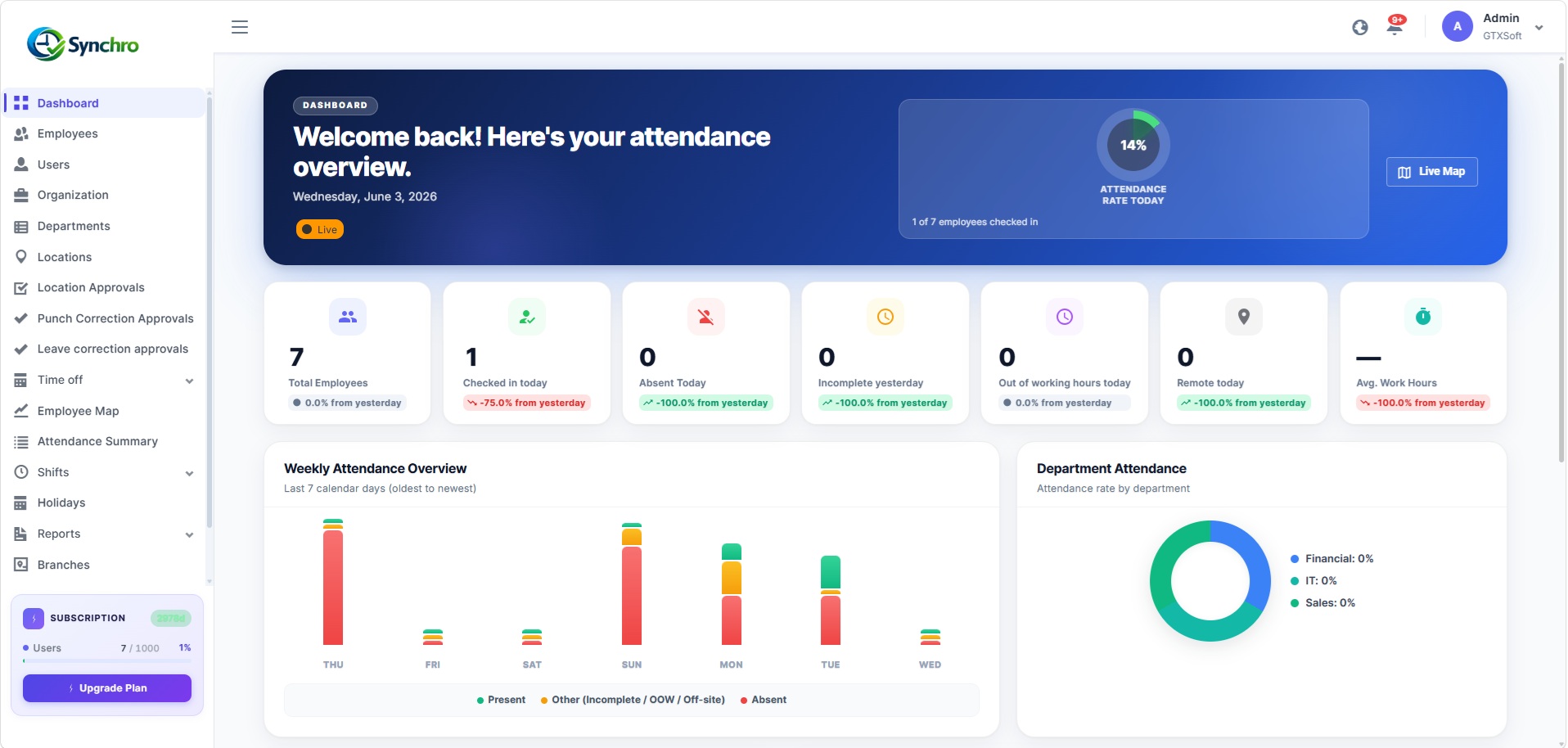
The Synchro admin dashboard: today's attendance, leave, headcount and contract alerts on one screen.

If the first week of every month goes to making the numbers match, you already know the problem.

Most HR teams in the region don't run on one system. They run on a time clock, a leave spreadsheet, a payroll file and a lot of email. None of them agree. Every exception is fixed by hand, every correction is an argument, and by the time payroll is right, the month is half gone.

Attendance you can't explain

The sheet says “absent.” The employee says they were on site. Nobody can prove it either way.

Leave balances that drift

Accruals, carry-forward and mid-year joiners live in formulas only one person understands.

A time clock that doesn't reach payroll

Hours get re-keyed. Re-keyed hours get disputed.

Corrections with no trail

Someone changed a record last month. No note, no reason, no name.

Tools your people won't open

English-only apps that field staff ignore, so HR chases everyone by phone.

Here's what changes when it's one system.

One connected workflow

From attendance to payslip, without rebuilding the data.

A punch, a leave request, a correction and a payroll input all touch the same record. Working time and overtime are calculated from attendance, payroll starts from figures that are already settled, and an approved correction rebuilds the day, the balance and the numbers downstream — with an audit-log entry for every change. HR reviews exceptions instead of reconciling everything.

See how corrections work
  1. 1

    Employee checks in

    From a Synchro Kiosk, a fingerprint device, or the web.

  2. 2

    Attendance is recorded and resolved

    Punches become one explainable daily status against your shift rules.

  3. 3

    Working time and overtime are calculated

    Split into in-shift and out-of-shift, to your policy.

  4. 4

    Payroll picks up the data

    Attendance, overtime, leave, loans and expenses arrive as inputs.

  5. 5

    Payroll is calculated, approved and posted

    Through the guarded five-state pipeline, with an approval gate before anything is posted.

  6. 6

    The employee gets a payslip

    In employee self-service.

Attendance engine

Every workday resolves to one status you can explain.

Synchro turns punch history, shift rules and approved leave into a single daily outcome — and it can show you why. Scheduled jobs finalize past days automatically, so yesterday is settled before you open your laptop. Work hours are split into in-shift and out-of-shift. Thresholds for lateness and short days are yours to set, with email and in-app alerts when they're crossed.

Present Auto
Absent Auto
Incomplete Auto
Out of hours Auto
Off-site Auto
On vacation Auto
Partially present Auto

Explainable, not just calculated

Open any day and see the punches, the shift it was measured against, and the rule that set the status.

Finalized on a schedule

Background jobs close out past days. HR isn't the batch process.

Thresholds you control

Grace windows, short-day limits and alert rules are configured to your policy, not ours.

New · Synchro Kiosk

Replace the branch attendance machine with a tablet.

Synchro Kiosk turns a compatible tablet into a face-recognition attendance terminal, wired straight into Synchro. Mount one at each branch entrance — employees check in and out with a glance, and every punch lands on the same record as web check-in. Less hardware to buy, cable, and maintain.

A kiosk punch is just another input to Synchro's attendance engine — it flows into the same statuses, corrections, leave and payroll as every other check-in.

Ask about Kiosk in a demo

Face recognition

Employees are recognised by the camera. No badge, no PIN, no queue at a shared device.

Check in and check out

A full-screen, camera-first flow built only for attendance. The kiosk works out in or out from the last punch.

Works offline

Punches are saved on the tablet and sync to Synchro automatically when the connection returns — a dropped connection doesn't drop a punch.

Easy setup

Create the kiosk in Synchro, then activate the tablet with a device code or the activation QR. It's bound to one branch from then on.

Centralized management

Every kiosk, every branch, managed from one Synchro environment — see what's online, when each device last synced, and its device details.

Remote control

Restart, lock or unlock a kiosk, push an employee sync, or refresh its configuration — without visiting the branch.

Secure by design

The admin area sits behind a dedicated Kiosk PIN with lockout. Face data is never stored as an image.

Arabic and English

The kiosk runs right-to-left in Arabic and left-to-right in English, like the rest of Synchro.

Less infrastructure at every branch

A traditional attendance machine

  1. Dedicated device
  2. Cabling
  3. Network setup
  4. On-site maintenance
  5. Managed branch by branch

Synchro Kiosk

  1. A tablet you already have
  2. Kiosk app
  3. Synchro
  4. One attendance record
  5. One system, every branch

The same logic runs your leave.

Time off

Leave balances stay right all year — and fix themselves when they don't.

Multiple leave types, multi-step approvals with delegation when a manager is away, per-employee balances by year, monthly accrual and year-end carry-forward — all on scheduled jobs, not month-end spreadsheets. When something needs changing, the employee files a correction with a reason; HR approves or rejects it with a reason of their own; the balance re-syncs on approval.

Down to the hour

Hourly and partial-day leave, not just full days.

Approvals that don't stall

Delegation keeps requests moving when an approver is out.

Every change has a reason

Rejections require a written reason. So do reversals.

Exports that hold up

PDF and Excel exports for audit, finance and payroll.

Which is why payroll starts from a better place.

Payroll module

Run payroll on data you didn't spend a week correcting.

Because attendance, overtime, leave and corrections already live on one record, payroll starts from numbers that are settled. The run moves through a guarded five-state pipeline — open, calculated, approved, posted, closed — so everyone knows where the cycle stands, and illegal jumps are blocked. Country-specific tax calculation covers Jordan and the UAE. End-of-service settlement is calculated automatically when someone is offboarded. Payslips are available to employees in self-service.

  1. Open
  2. Calculated
  3. Approved
  4. Posted
  5. Closed

Payroll is a plan module — switch it on when you need it. Synchro calculates pay and end-of-service settlement and produces payslips; filing to government portals is a step your team completes with the figures and exports it generates.

Recruitment & lifecycle

From job post to first payslip without typing anyone in twice.

Synchro's applicant tracking runs the full path — requisition, a branded public careers page, applications, interview scheduling, scorecards, offer, hire. On hire, the candidate becomes an employee record in one click; no re-entry. From there, onboarding and offboarding are tracked as cases, contract history stays on the record, and access is deactivated automatically the day someone leaves.

A careers page that's yours

Public, branded, and connected to the pipeline behind it.

Scorecards that count what's submitted

Draft feedback doesn't skew the average. Only submitted scorecards do.

One click to employee

The hire becomes a record — profile, contract, access — without a hand-off.

Access ends on schedule

Termination triggers deactivation. No stale logins.

One platform

Attendance is the core. It isn't the whole platform.

Because attendance, time and pay already run on one record, the rest of HR builds on the same foundation — the same approvals, the same audit trail, the same people.

Employee lifecycle

Onboarding checklists, asset custody, multi-department clearance, and end-of-service settlement into payroll.

Recruitment

Requisitions, a candidate pipeline, interview panels and scorecards, offers, and one-click hire to employee.

Performance & KPI

Job positions and descriptions, skill and competency assessments, KPI templates and review cycles, a per-employee performance profile.

Training & development

A course catalogue, assignments with approval and reminders, completion evidence, and certification expiry alerts.

Loans & expenses

Employee requests with eligibility rules, approval and grant steps, and repayments or reimbursements bridged into payroll.

Tasks & projects

Projects with a configurable workflow, tasks with comments and tags, and reusable task templates.

Documents, news & calendar

A shared document library with folders and share links, company announcements, and a published company calendar.

AI assistant

An in-portal assistant that answers questions and acts within the user's own permissions; runs on your choice of AI provider.

Every module is plan-gated — turn it on when you need it. Explore Synchro plans

Web & mobile

The people in the field and the people at the office, on the same rules.

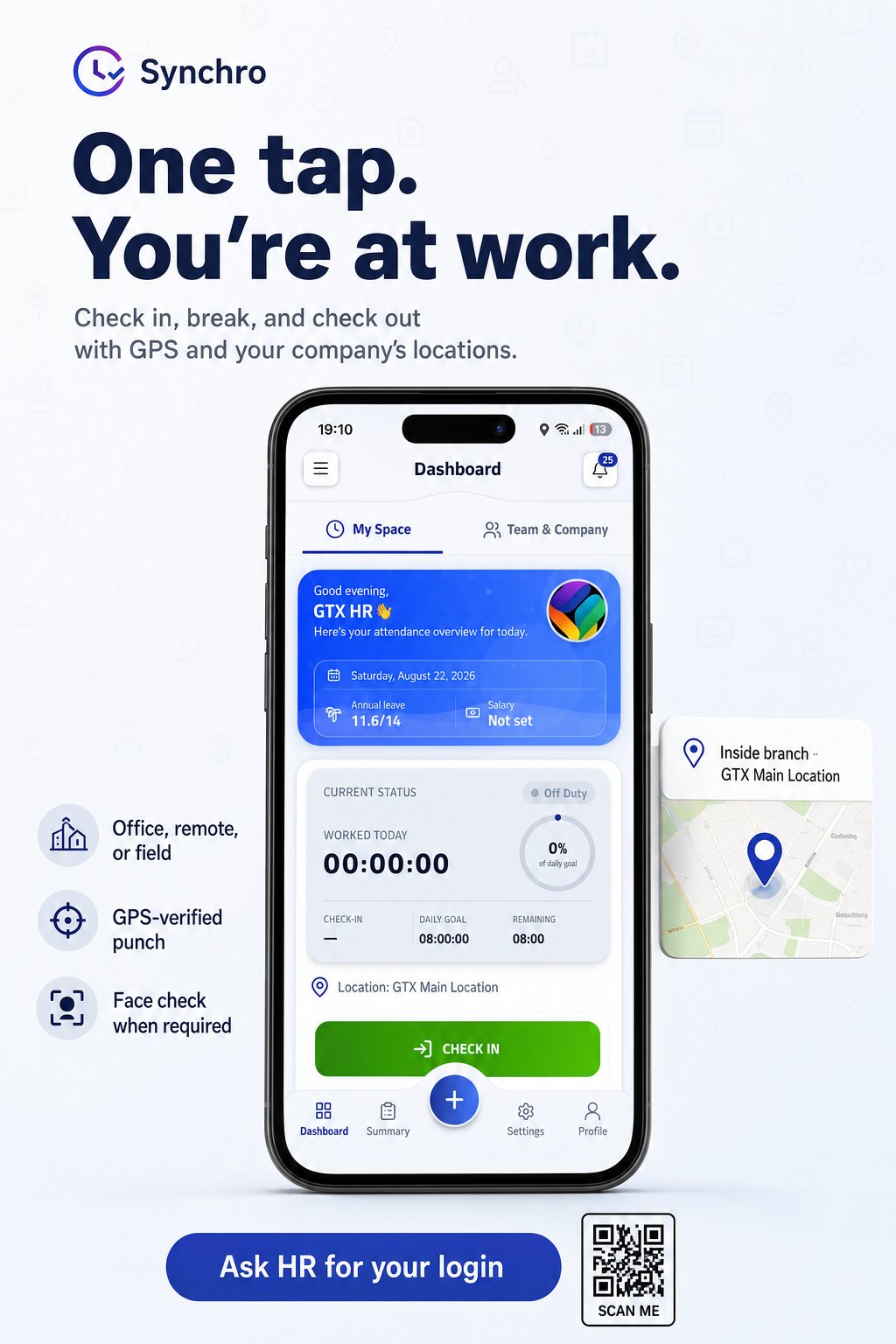
The Synchro mobile app — launching soon for iOS and Android — lets field staff check in with a selfie and a GPS location, even with no signal; punches sync when they reconnect. Locations are geofenced per site, so on-site and off-site are decided at punch time, not in a review queue. Managers see their team on a live map and approve leave, overtime and corrections from their phone. Every screen is in Arabic or English.

Punches that survive a dead zone

Offline-friendly check-in; syncs on reconnect.

Location decided at the door

GPS geofences flag on-site or off-site automatically.

Punch integrity built in

Device binding, selfie verification and impossible-travel checks guard against buddy-punching.

Approvals from a phone

Managers clear the queue without a laptop.

The Synchro app: GPS-verified check-in against your company's locations, with a face check when required.

Once HR, managers and employees are all in the same system, they can talk to each other on it too.

New · Synchro Connect

One inbox for HR, managers, and every employee.

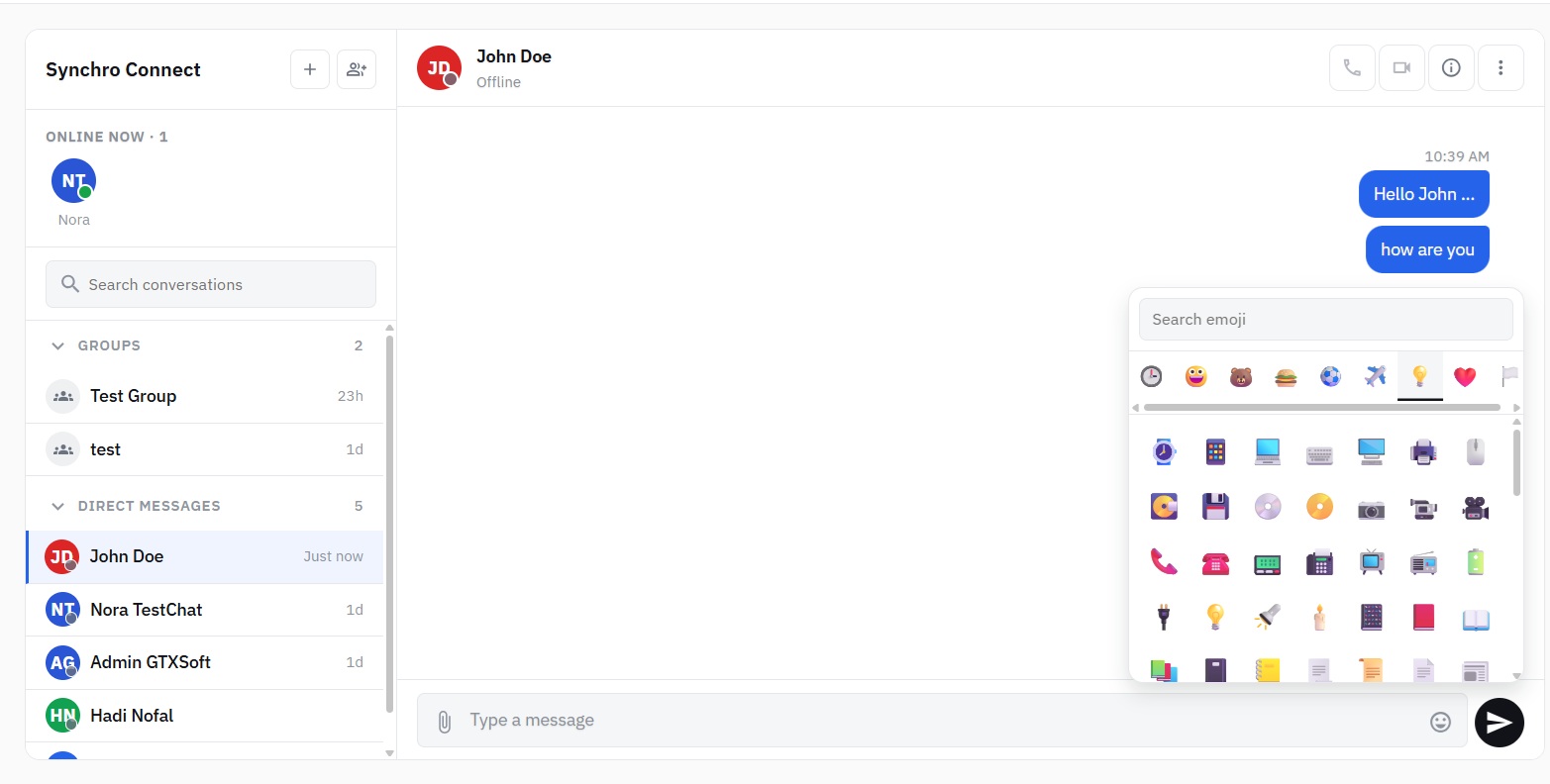
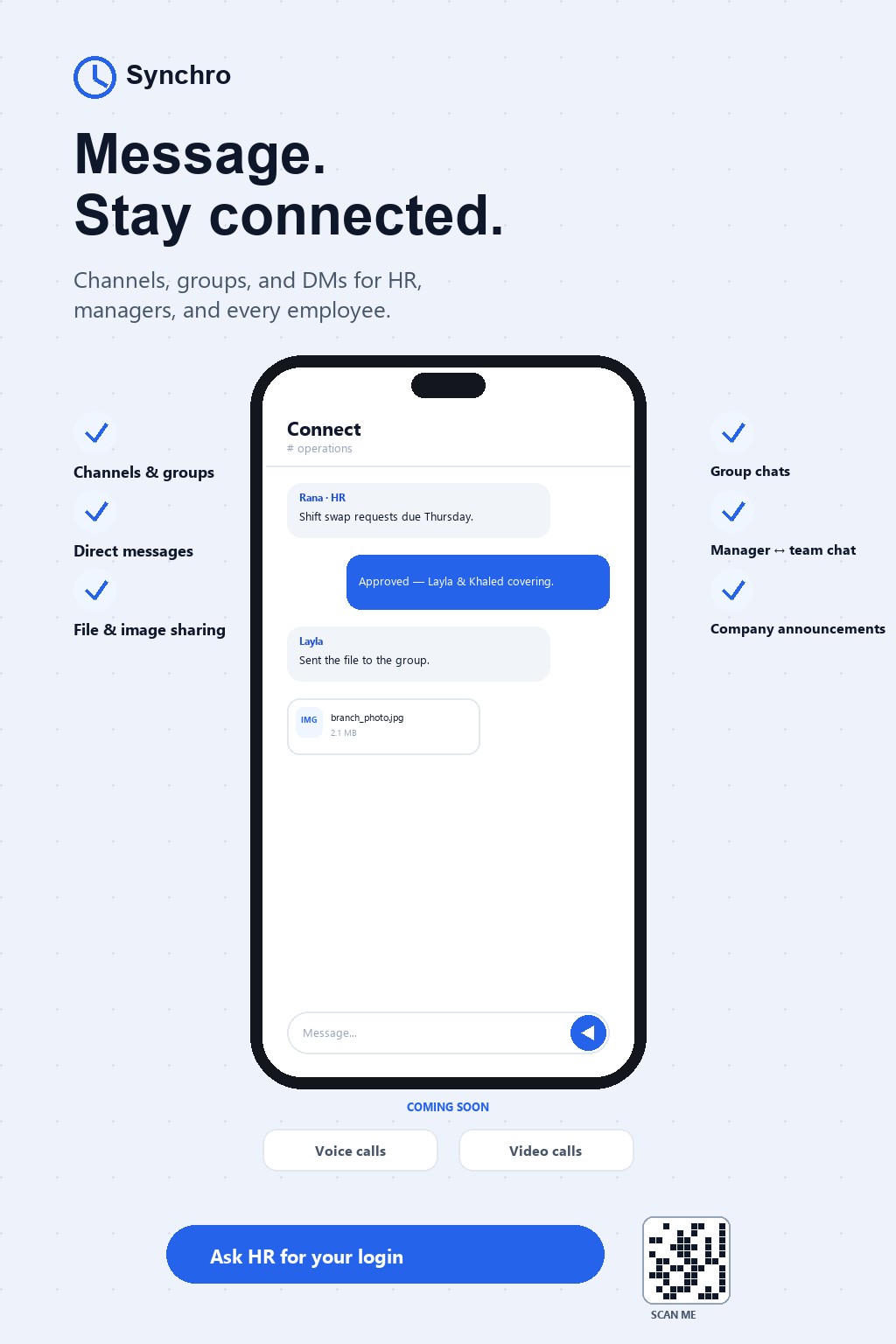
Synchro Connect brings messaging inside the platform your people already use for attendance and leave. HR broadcasts to the whole company, managers run a channel per branch or shift, and any two people — employee to employee, employee to manager, employee to HR — can just message each other. Create channels, spin up groups for a project or a site, and share files and images without leaving Synchro. It's available today on web and mobile.

Channels & groups

Stand up a channel per department, branch, or project — or a private group for a specific team.

Direct messages

One-to-one conversations between any two people in the company, across roles.

Files & images

Share documents, photos, and attachments straight into a channel or a DM.

On web and mobile

The same conversations, in sync, whether HR is on a laptop or a manager is on the shop floor.

Coming soon Voice calls · Video calls — meetings inside Synchro, no separate app
Synchro Connect on the web: a channel, its members, and the messages in it.
Synchro Connect on mobile: channels, direct messages, and file sharing.

Synchro Connect on the web: a channel, its members, and the messages in it.

All of it visible from one screen.

Visibility

Leadership sees the workforce in real time. Auditors see every change.

The dashboard shows who's in, who's absent, who's on leave, average work hours, and which contracts are ending — for the whole company or one department. Underneath it, every create, update, approval and rejection is logged per user and per company. The number on the executive's screen and the record behind it are the same thing.

One dashboard, company or department

KPI cards, weekly attendance, contract alerts.

A full audit trail

Every action attributed, per user, per company.

No private edits

Corrections carry reasons; the log carries names.

The company dashboard — headcount, attendance rate, and contract alerts at a glance.
Bilingual

Arabic isn't a language pack. It's how Synchro is built.

Every screen — web and mobile, admin and employee — works right-to-left in Arabic and left-to-right in English, and each person picks their own. Not a translated overlay on an English layout. Built bilingual from the start, because the region is.

English · LTR

Check in · Request leave · View payslip

العربية · RTL

تسجيل الحضور · طلب إجازة · عرض قسيمة الراتب

Bilingual from the first line of code, not bolted on afterwards.

Deployment

Run it in our cloud, or on your own servers. Same platform either way.

Some organizations can put employee data in the cloud. Some can't. Synchro runs both ways — managed cloud, or on-premises inside your own infrastructure — with the same features and the same security model. If your policy changes later, the platform doesn't have to.

Managed cloud

We host, patch and back it up. You use it.

On-premises

Your infrastructure, your network, your control.

Same features · Same security model · Same product

However you deploy, the security model is the same.

Security

Built so HR, IT and finance can trust the same numbers.

Every company's data is isolated at the data layer — no tenant can see another's records. Traffic runs over TLS; data is encrypted at rest. Access is role-based and granular, down to the module. And Synchro blocks anyone from approving their own leave, overtime, loan or expense — a conflict-of-interest check you don't have to remember to enforce.

Per-company isolation

Data partitioned per tenant at the data layer.

Encryption in transit and at rest

TLS everywhere; encrypted storage.

Granular role-based access

Custom roles; per-module permissions.

Self-approval blocking

Nobody signs off their own request.

Access lifecycle automation

Deactivated on termination, on schedule.

Automated backups

Regular, monitored, on managed infrastructure.

Multi-tenant architecture with per-company data isolation and a full audit trail on every action.

Integrations

Connects to the directory and the hardware you already run.

Single sign-on and user provisioning run through Microsoft Entra ID. On-prem directories sync over LDAP and Active Directory. Existing fingerprint clocks register through the device hub and feed the same attendance record. A versioned REST API powers the web portal today; public developer docs are on the way.

Microsoft Entra ID — SSO & provisioning
LDAP / Active Directory
Fingerprint devices
REST API (docs coming soon)
Choosing a system

Where Synchro fits against the systems you're probably comparing.

Most HR buyers in the region weigh three kinds of system. Here's the honest trade-off.

Legacy regional HR suites Global cloud HR Synchro
Modern web & mobile experience Often dated; low daily adoption Strong Strong
Native Arabic & RTL Yes Weak or partial Yes, built-in
Cloud and on-premises On-prem heritage; cloud varies Cloud only Both, same platform
Attendance & shift depth Varies Usually light Explainable statuses, geofencing, corrections
Attendance flows into payroll Separate modules, reconciled by hand Add-ons or an integration to maintain One connected workflow, one record
Employee self-service (leave, payslips, mobile) Varies Common Web and mobile, bilingual
Published plans + self-serve trial Rare; demo-gated Common Published plans, free trial, no card

If you need Arabic-native HR, a real attendance engine that carries through to payroll, and the choice of where your data lives — that's the gap Synchro is built for.

Pricing

Plans that turn modules on and off — not plans that count heads.

Move up a plan when you need a module — payroll, recruitment, corrections, location approvals — not because you added seats. Change plans from the organization page whenever you want. The free trial needs no credit card.

Explore Synchro plans

Questions HR and IT ask us

Is Synchro really bilingual, or is Arabic a translation layer?

It's built bilingual. Every screen on web and mobile works natively in Arabic (right-to-left) and English (left-to-right), and each user chooses their own language. It was designed this way from the start, not localized later.

Can we run Synchro on our own servers?

Yes. Synchro runs on-premises inside your infrastructure or as a managed cloud service, with the same features and the same security model in both. You can move from one to the other if your requirements change.

Where does our data live, and is it separated from other companies?

Each company's data is isolated at the data layer — no tenant can query or see another's records. In the cloud, data is encrypted in transit and at rest with monitored, automated backups. On-premises, it stays entirely within your environment.

Does Synchro calculate payroll for my country?

Synchro runs the full payroll cycle — calculation, approval, posting and payslips — with country-specific tax calculation for Jordan and the UAE and automated end-of-service settlement. It produces the figures and exports your team files with the authorities; it does not submit to government portals directly. Tell us your country's requirements in a demo.

How does moving off spreadsheets or another system work?

You import employees, contracts, balances and historical attendance, then run Synchro in parallel for a cycle to check the numbers before you switch. A demo is the fastest way to scope your specific migration.

Is there a free trial?

Yes, with no credit card. Register your organization and you're running in minutes. The trial uses your real data so you can judge it properly.

Web and mobile both?

The full web portal for HR and managers is available today. The Synchro mobile app for employees and field teams — check-in, leave, payslips and approvals, fully bilingual — is launching soon for iOS and Android.

Do we still need fingerprint machines?

Not for branches that use Synchro Kiosk. A compatible tablet running the kiosk app becomes the branch attendance point — face recognition, check in and check out — and every punch lands on the same record as web check-in. You can also keep existing fingerprint devices and register them through the device hub.

How is this different from a legacy HR suite or a cloud HR tool?

A legacy suite is usually several modules you reconcile by hand, with dated screens people avoid. A global cloud tool is modern but rarely Arabic-native, cloud-only, and light on attendance. Synchro is one reconciled record, Arabic-native, deployable either way, with a real attendance engine.

See Synchro run on your own data.

A demo takes about 30 minutes. Bring your shift rules, your leave policy and one messy month — we'll show you what the record looks like when it reconciles itself.

No credit card for the trial · Arabic & English · Cloud or on-premises · Your data stays yours